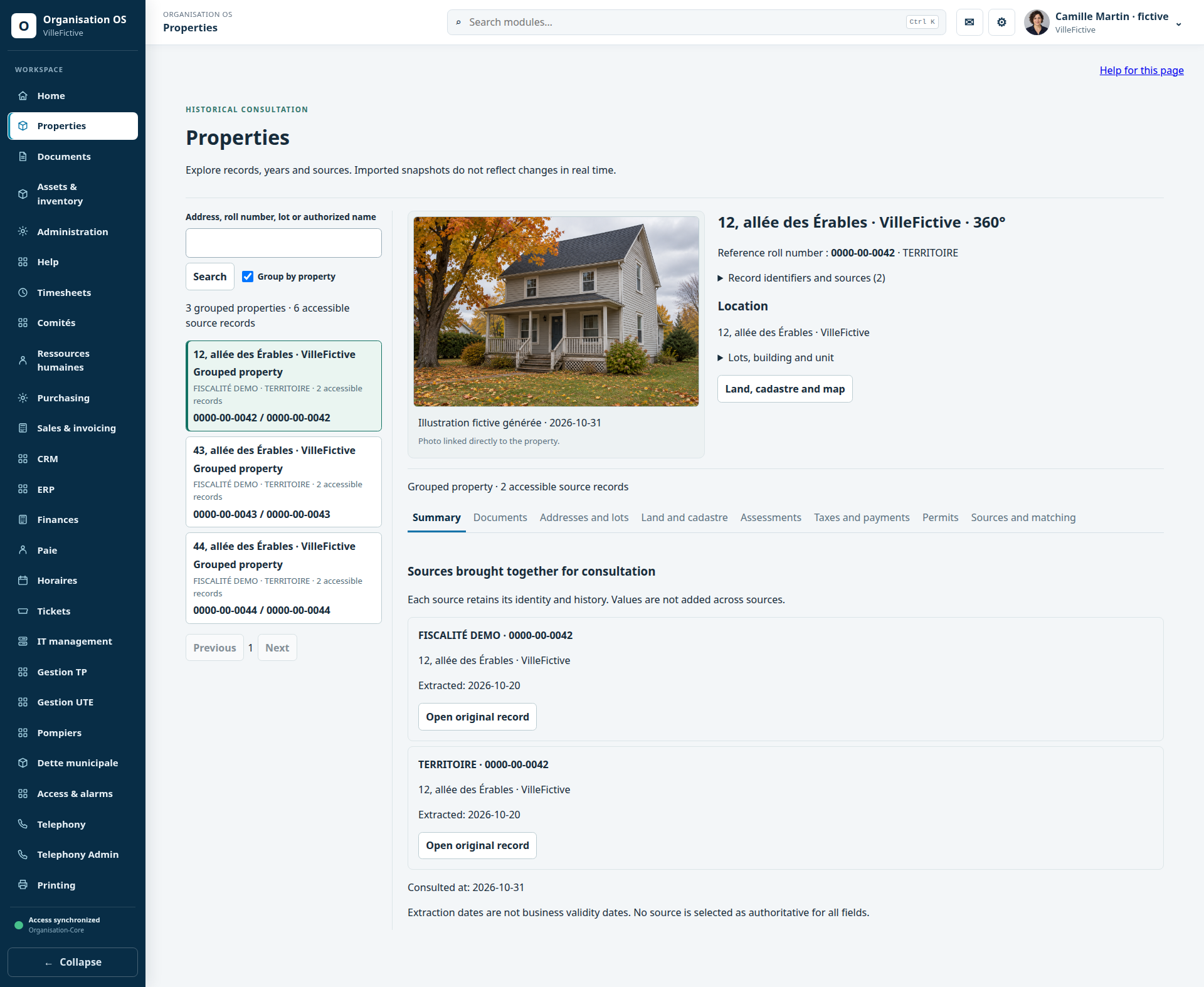
The selected property brings together two source records. The address, roll number 0000-00-0042 and DEMO-042 reference stay consistent throughout the first five views.
Step 1 / 6 · Property 360
Enlarge preview ↗Selected property · grouped sources — Real product interface · synthetic VilleFictive data. English navigation; module controls and demonstration data retain French labels.Workflows, access and planned features
Properties requires authorized profiles and sources. Permit and tax views consult historical snapshots. Mapping depends on the JMap connector and permissions: no authenticated customer JMap map was opened for this demonstration. Tickets can display existing document references; file uploads remain disabled until the antivirus gate is qualified.
Read every workflow in text
Municipalities — One property. Several perspectives.
At 12, allée des Érables, explore the same property through planning records, tax information, documents and cadastral data.
Property 360
The selected property brings together two source records. The address, roll number 0000-00-0042 and DEMO-042 reference stay consistent throughout the first five views.
Planning
Application DEMO-URB-042 concerns this property’s front porch. Review the dates and historical permit DEMO-P-042.
Accounting
Historical account DEMO-TAX-042 shows two tax lines, due dates and an allocated payment entry. It is not a consolidated current balance.
Documents
Plan-galerie-DEMO-042.pdf is referenced in the property record. This example shows a reference to retrieve; it does not simulate an available download.
Mapping
Lot DEMO-042 remains associated with the same address. This capture of the mapping component uses synthetic geometry, without a customer basemap or mapping service.
Also: Tickets
A separate example: DEMO-MUN-204, a footbridge repair on the sentier des Pins trail. Alex is assigned, with messages and a document reference visible. No link to DEMO-042 is simulated.
Properties requires authorized profiles and sources. Permit and tax views consult historical snapshots. Mapping depends on the JMap connector and permissions: no authenticated customer JMap map was opened for this demonstration. Tickets can display existing document references; file uploads remain disabled until the antivirus gate is qualified.
Business and services — From a contact to the next meeting.
Camille is preparing a maintenance offer for Atelier Rivage. File COMM-042 keeps the contact, opportunity and next follow-up together.
The customer relationship
The selected record shows Nora, the workshop manager, her fictional email address and Camille’s next action.
The sales opportunity
Opportunity COMM-042 covers three machines: an estimated $1,250, a qualification stage and a target date. This amount is neither an issued quote nor an invoice.
The next follow-up
Follow-up COMM-042 schedules the November 5 visit with Nora. It belongs to the same CRM relationship.
The CRM supports the relationships, opportunities and activities shown. Opening Sales for the same customer identity requires that module and the appropriate permissions; no commercial document is issued here.
Commerce and industry — Find an equipment record and its documentation.
Press DEMO-IND-001 has an identity in the asset directory. Its manual is consulted in document management using the same reference.
The selected machine
The press record shows its category, serial number, workshop location and counts of inspections and document references.
The manual in document management
Manuel-presse-DEMO-IND-001.pdf: the 360 panel shows responsibility, version and document information.
The document history
Review the two versions and events for the same manual. Reference DEMO-IND-001 keeps the press in context.
The directory opens the native asset record; this view displays counts rather than inspection details. The manual is opened separately in document management using the matching reference. This demonstration adds no automatic connection.
Agriculture and food — Everyday equipment and harvest tracking.
A fictional farm finds its tractor and reviews stock for carrot harvest lot C-108.
The selected tractor
DEMO-AGR-001: category, serial number and location identify the vegetable farm’s tractor in its native asset record.
The carrot lot
C-108: 240 kg on hand, 60 kg reserved and 180 kg available. Squash and potatoes provide context for the store.
The lot receipt
DEMO-REC-C108 records the receipt of 240 kg from lot C-108. Stock movements remain separate from the tractor record.
Stock uses quantity and movement registers; this interface has no lot 360 record to open. Planned: animal records, recipe-based procurement matching and federated exchanges. None is simulated in these captures.
Appointments and activities — Plan an activity together.
The association’s committee is preparing pottery workshop LOIS-042. A meeting, action items and documents organize the team’s work.
The selected meeting
The November 7 meeting brings together the workshop context in room A, VilleFictive.
The action item
Camille is responsible for preparing 12 material kits for LOIS-042. The action belongs to the selected meeting.
The meeting documents
Ordre-du-jour-LOIS-042.pdf is a document reference for that same meeting.
These views show internal committee coordination. Planned: specialized bookings, public registration and animal records. The meeting record is not a booking system.